Archive
Recycling Phones, Laptops, and Ipods in New York City: Figuring it Out

I can’t imagine that I’m unique in having a hard time just throwing away an old phone, computer, or iPod.
However, the “old technology” pile has grown to take up way too large a percentage of the square footage of a New York apartment.
Although this random assortment of obsolete devices may have their greatest value as paperweights, all that metal and all those microchips should be worth something to someone. The thought of all that non-biodegradable them sitting in the bottom of a landfill (times several million residents) is enough to make me sick.
Until recently, though, the only place in NYC to recycle old technology has been the LES Ecology Centers’ eWaste initiative.
So I was pleasantly surprised to find that the legislature has been busy outlawing throwing these sorts of things out, starting in 2015 while the recycling section of the NYC.gov website offers some great option for buyback programs.
Yep – that’s right, you may be able to get some cash for your old stuff.
However, a reverse caveat emptor is in order in this case (seller beware). The sites differ wildly in their offer amounts and there’s no consistent rule that one is better than another. (Check out two of my price comparisons below).
Also, shipping / pickup policies are different at different shops, so you’re not always comparing apples to apples.
Regardless of the takeback price achieved, it’s good to see that there are now a large number of options to sell (or recycle) your old stuff.
For my Android Incredible II
$20 at Gazelle
$20 at Buymytronics
$35 at Best Buy’s trade-in center$70 Verizon Trade In
$75 at YouRenew
$120 at J&R Music World
$156.50 at Amazon Trade In
For a MacBook 13″ Late 2007 model
J&R: $144
Yourenew: $147
Bymytronics: :$187
Best Buy: $270
Donating Blood Platelets: Figuring it Out
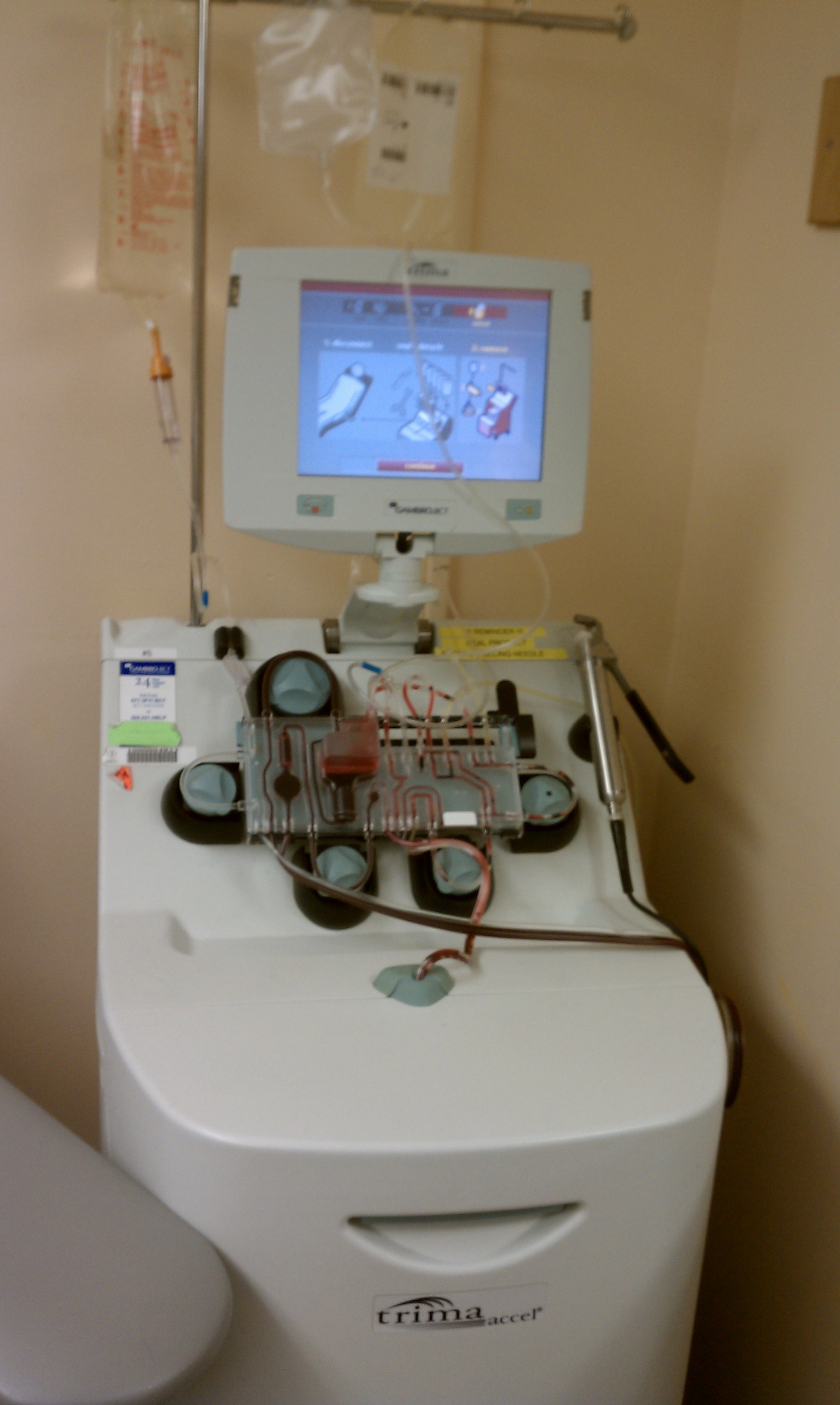
the apheresis machine at Memorial Sloan Kettering
Towards the end of last year, my friend Eric LeVine mentioned that he couldn’t meetup on a particular day because he was donating blood platelets. I was intrigued because I imagined that platelets are in short supply (they are) and it seemed to be a way to have a direct impact on someone in need without writing a check.
It turns out that donating blood platelets is easy, fast, and with few side effects. Blood platelets are also in high demand because they have a very short lifespan (5-7 days v. 40-50 days for whole blood) and there aren’t a lot of sites where one can donate platelets. The equipment is expensive and hospitals are generally not great at marketing, nor do they have the budget.
An overview of the blood platelet donation process in two sentences:
When you donate blood platelets, you are hooked up to a machine that draws your blood (known as a platelet apheresis machine), pipes it to a centrifuge that separates out (and keeps) your platelets and returns your red blood cells, white blood cells, and component plasma back to your body, along with some short-term anti-coagulant. The machine is outfitted with a single-use kit so there is no risk of blood contamination to the tubing or centrifuge.
What happens and how long does it take?

the post-donation juice and cookies at MSK
1. Show up at the hospital and fill out paperwork (15 mins)
2. Have your blood pressure checked and finger pricked for a hemoglobin level test (15 mins)
3. Get hooked up to a Apheresis machine (5 mins)
4. Have the machine draw some initial blood which is evaluated for your platelet count (5-10 mins) [min to donate is 150k]
5. The tech enters your platelet count, height, & weight into the machine and the number of units and time of your session are calculated
6. The Apheresis machine takes out your blood, centrifuges the platelets out, and then returns whole blood (70-100 mins)
7. If the flow of your blood is not optimal, it will alert the technician to slow down the “draw” and “return” and the tech will increase the time of your donation.
8. Reap the benefits of being a platelet donor! (juice and cookies)
(Total Appoximate Time: 110-145 minutes)
What Does it Feel Like?
Donating platelets feels very similar to donating blood, however, occasionally there is a “flutter” when the machine reverses directions as well as an odd cooling sensation in your arm as blood is returned to your body. Note that my experience was based on a single-arm machine as opposed to a double-arm machine. I was told that double arm machines are more or less obsolete and have almost entirely been replaced by single arm machines.
What do they do with those platelets?
According to Memorial Sloan Kettering’s Platelet Donation FAQ page:
“Some cancer treatments cause a loss of platelets. These specialized blood cells help control blood clotting. When platelet levels fall too low, patients are given a transfusion of platelets to replenish their supply and prevent life-threatening hemorrhages. Some patients, especially those who have had a bone marrow transplant or who are being treated for leukemia, may require daily platelet transfusions for several weeks.”
Also, have i mentioned that if you donate, you are offered juice and cookies?
Why not donate both whole blood and platelets?
From the MSK page and some other research on the web:
- It can take 5-10 bags of whole blood to get enough platelets for a single transfusion, however, there are usually enough platelets in a single donation for transfusion(s) to one or sometimes even two recipients
- A single donor also simplifies the process matching your platelets to the recipient.
- Replenishment of platelets takes days, not months (like whole blood)
- There are fewer side effects (see below) and you can donate more frequently because your plasma, RBC, and WBC are returned to you during the procedure
- You can always donate whole blood too
- It seems, unlike whole blood donation, that platelet donation only screws with your hydration but has a limited impact on VO2 Max and endurance … which is good for those of you worried about your performance on the bike.
Side Effects:

my platelets
In my first donation, there were absolutely zero side effects, other than being a bit tired afterwards and a slightly sore arm … or at least none that I could tell.
Longer term, like anything else requiring you to insert a needle into your arm frequently, vein scarring is a potential concern—it will make it harder to draw or receive blood in the future—though this side effect seems to be most likely when your donations are “frequent.” (<-I’m not sure I understand the definition of this word as it relates to blood donation).
Eric, who introduced me to the whole idea of platelet donation, experiences what are generally described by most donors as the “worst” side effects.
He said:
“The thing that bothers me most physically about the platelet donation is the anti-coagulant they use. It tends to cause calcium imbalance issues for people. It always makes my lips tingle. I eat the maximum Tums dose during the donation which helps a bit. Last time they dialed down the level of AC’s disbursed into my blood, and I felt much better at the end of it.
The only time I have felt awful doing platelets was one time when I didn’t have a good meal in beforehand. I had time scheduled and then had to make an unscheduled trip to my son’s school. So as a result I didn’t have breakfast. I felt like walking death after the platelet donation.”
His advice:
“Eat a good meal. Also make sure to have some yogurt or milk or cheese or something very calcium rich before. Some people (me especially) have an odd reaction to the anti-coagulant drip they add to your blood before they re-inject it. Weird lip tingling. I end up eating 10 Tums capsules during each session and also asking them to dial the AC drip down if possible.”
Where to Donate in New York

The M15 Express Bus Outside Sloan Kettering's Donation Room
Bloodbanker.com is a routinely recommended site to find a blood donation center, however, within New York, you have have to enter the specific zip code to find a location, so it’s not very useful.
I went to the Memorial Sloan Kettering Blood Donation Room (212-639-7643) which is located on on the ground floor of the Schwartz Building at 1250 First Avenue (Between 67th and 68th Streets) They’re open 364 days per year and appointments are required, as they have a limited number of machines. The staff were kind, courteous, professional, and genuinely appreciative. Also note uptown express bus stop directly outside their front door.
I’ve also heard about The NY Blood Center which is more of a marketing organization that promotes blood donation at its own centers. They’re a non-profit that sells the blood (and blood components) they collect to hospitals. My understanding is that they use the revenue generated run the organization, which operates blood donation centers and promotes blood donation.
While there is certainly a cost to marketing and operating a non-profit like that, and it fills a large void for hospitals that don’t have their own blood donation center, I wanted my platelets to stay in-house and to go directly to a patient in need without a financial transaction … so I chose MSK. However, the more I think about it, I’d be interested to learn if MSK charges their patients for the platelet component of platelet transfusions and what percentage, if any, is for the platelets themselves. I sincerely hope that they’re not profiting on my blood!
Resources:
http://www.mskcc.org/giving/blood/faqs-donating-blood-platelets
http://www.redcrossblood.org/donating-blood/types-donations/platelet-donation
Homebrewing: Figuring it out

Making your first homebrew is actually quite easy, especially once you know the general overview of what it is that you’re supposed to be doing.
So, it’s surprising that so few books and blogs on the topic of the brewing beer at home give a succinct and chronologically accurate overview of the steps required, followed by detailed instructions on what you specifically need to do. (see: The Complete Joy of Homebrewing v3, Beer Captured, and the top 10 Google results for “your first homebrew”).
Even a visit to a brew-shop may not clarify things. The folks at Maltose Express in Monroe, CT, while helpful, didn’t do much to help us figure out what we needed to do in what order — instead, we walked out of there with $200 in equipment and ingredients, a sinking feeling that this brewing beer was really complicated, and two sets of conflicting written instructions on what to do.
Maybe I’m the only one to consume “how-to” information in short step-wise fashion, followed by detailed instructions? Or successful beer home-brewers just non-linear thinkers? or drunk? or both?
The bottom line is that brewing beer can be incredibly simple.
For your first brew, you can get away with a very simple 2-day process using
– Hop Flavored Malt Extract
– Water
– Yeast
Day 1
Step 1: Add some malt extract to some water create wort, which you boil for about an hour.
Step 2: Cool the wort down, transfer to a fermentation vessel
Step 3: Add Yeast
Step 4: Ferment (7-14 days)
Day 2
Step 5: Add sugar and bottle
Step 6: Wait for bubbles to develop (7-14 days)
Step 7: Drink
While 2-day, rapid brewing is fast it won’t likely generate beer that is particularly inspiring.
A slightly more complicated and time consuming path requires:
– Malted Grains (for flavor & color)
– Dried and/or canned Malt Extract (for fermentable sugar, flavor, and color)
– Hops (possibly different kinds, for bitterness, flavor, aroma & “complexity”)
– Irish Moss (to clarify your beer)
– Water
– Yeast
Day 1
Step 1: Add your malted grains and let steep in water
Step 2: Bring the water to a boil and immediately remove the grains
Step 3: Add Dried Malt Extract, Canned Malt Extract, Hops, Irish Moss
Step 4: Boil for 45 Minutes
Step 4a: Add some more hops for more flavor complexity, boil for 15 mins
Step 4b: Add some more hops for more aromatic complexity, boil for 1 min
Step 5: Cool your wort
Step 6: Add yeast
Step 7: Ferment (7-14 days)
Day 2
Step 8: Rack your beer (remove from the lees) into another fermentation vessel
Step 9: Ferment (again, 3-4 weeks)
Day 3
Step 10: Add sugar & Bottle
Step 11: Wait for bubbles to develop (7-14 days)
Step 12: Drink
What kind of beer will result from the two above methods? Ale!
It’s important to make clear, at the risk of oversimplifying things for the sake of novice homebrewing, that there are two kinds of beer: ales and lagers. The main difference between the two? The type of yeast used — you guessed it ale yeast v. lager yeast –and the temperature at which these yeasts can ferment. For ales, this temperature is 60-75 degrees, while for lagers, it’s 33-50. The grains and hops used within a style of fermentation further define what kind of beer you’re making.
Examples of Ales:
Bitter (ordinary, special, extra special)
Mild
IPA
Brown Ale
Stout
Barleywine
Porter
Wheat Beers (Weizens/Weisse/White/Wit)
Kolsch
Lambic
Saison
Dubbels&Tripels
Examples of Lagers:
Pilseners (incl. everything from Budweiser to Oktoberfest)
German Bocks & Doppelbocks (incl. Helles & Dunkel)
Dunkel
Schwarzbier
Rauchbier
Dortmunder
Why so much German on the lager list? They were the ones to popularize the style in the late 19th century — the word “Lager” is approximately translated as “To Store or Warehouse” in German, which makes sense, because some lagers are matured for up to 3 months.
Now that you have an overview of the process, check out Joe Postma’s three very helpful Serious Drinks articles on grain, hops, and yeast.
Next up: Brew day and the specifics of how to make the magic happen, with a minimum of fuss…

Nice Post (P1) Up at NYC Velo

My post on the first half of a recent cycling trip in Nice France is up at NYC Velo
Cell Phone & Internet Service in Hong Kong
After a ton of research, I determined that there’s really only one way to go for phone service if you’re visiting Hong Kong from the United States for any length of time: get a PCCW International SIM Card and subscribe to the monthly wifi plan. It will cost you a grand total of $116 HKD (~$20) and give you unlimited Hong Kong Wireless and calls to the United States (and a bunch of other countries) at $.25 HKD (~3 cents) a minute.
The most convenient place to buy your SIM Card is at 7-11 in the Hong Kong airport. Purchase the $68 HKD PCCW IDD Global Reach card
Note that PCCW Wireless is free in the airport so once you’ve installed your SIM you can subscribe to the PCCW single device WIFI plan here and activate your phone.
Notes:
1) The wireless plan is not the best choice if you think you’ll need wireless while on the move (tram, walking, on the metro) — in that case, the SmartOne Vodafone 3G may be attractive to you, but there are data limits…
2) In order to get the $.25HKD airtime rates internationally, you MUST dial via 0600 + Country Code + Number … so, that means to call the States you dial 0060 + 1 + 212 555 1212, for example.
CAREFUL: If you dial 001 then you will be charged “full boat” or $2.60HKD per minute. Ouch! Also note that if you’re calling mobile #s in some countries, additional charges apply.
3) Perhaps obvious, but you’ll need a 2/3G cell phone that’s unlocked. For my purposes I chose the Google Nexus One — it was by far the most affordable completely unlocked phone that you can buy stateside or abroad. ($270 v. $400+ for androids with similar capabilities). So far, it’s been *great*
4) You may want to buy recharge vouchers at 7-11 as well. When topping up your phone by Credit Card, it takes at least 2 hours for your credit to activate — not exactly convenient if you’re on a call and run out.
5) PCCW only accepts Visa for all transactions. If you’re travelling extensively it’s probably best to apply for a Capital One Venture card.
Sonos Desktop Controller Wireless Connection Problem
So this isn’t supposed to be a blog about technology — it just seems that these are the easiest topics to fire off quickly.
I received a Sonos ZonePlayer for Christmas (great product — now i can play music from any computer in the apartment), but it took about an hour for me to setup on my (PC) laptop. When my laptop tried to connect with the ZonePlayer, nothing would happen.
Luckily I had already set it up on a Mac so I knew the hardware configuration was working. After about half an hour of digging in the Sonos Forums and confirming that it wasn’t my Windows 7 Firewall settings I discovered that the root cause was that I was running VMWare on the laptop and that the sheer presence of the virtual network adapters were interfering with discovery. I can’t imagine that I’m the only one that’s running a virtualized operating system. It is (nearly) 2011, right? A good addition to the Sonos ZonePlayer Connection Problems FAQ for sure, rather than buried in a forum.
Postscript: I also had no idea about ITunesPlus and the “upgrade path” for .m4p (protected) files. Long story short: If you bought music on ITunes it may have digital rights management. If you want to upgrade, it’s $.30/song.
Editing Your HTC Incredible Android Dictionary
After an hour or so of searching, it was right in front of my nose.
Settings…Language And Keyboard…Touch Input…User Dictionary.
Wow, there are a lot of words that I’ve added.
 wineandbikes